


|
|
|
|
|
One you've created a Trigger, you need to adjust it to fits your particular needs. Changes take effect immediately, so it's easy to experiment. Use the Deactivate button if you need to suspend triggering.
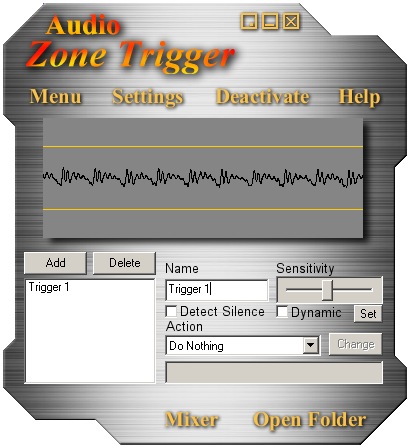
To adjust a Trigger
Its settings appear.
Name |
Unique name identifying the Trigger. |
Sensitivity |
Use the slider to adjust the level of noise required to set off the Trigger. (The background turns blue when you set off a Trigger.) |
Detect Silence |
Select to invert the Trigger. It is then set off when the noise level drops below the level set in Sensitivity. |
Dynamic |
Select to automatically offset the sensitivity as the environment's noise levels change. This is useful for detecting peaks in sound, independently of actual volume. |
Action |
Specify the response to the trigger. Audio Zone Trigger walks you through these:
|
To open the Save folder
The Save folder - where sound files are saved - is specified in General settings.