Motion Detection Software
PRODUCTS
OEM & CUSTOM
SUPPORT & INFO
CONTACT US
 Webcam Zone Trigger
 Media Zone Trigger
 Audio Zone Trigger
You'll need a PC, a hardware camera, and a software program to deal with the incoming video. There are many types of cameras, you'll have to pick the one that best suits your needs without spending a fortune. There are many software products to deal with the live video, the good news is that most of them allow for a free trial before you comit. For This article will only deal with the Webcam Zone Trigger software, since this is ours.
Cameras not only come in all looks and sizes, but with all sorts of connections.
Here is a breakdown...
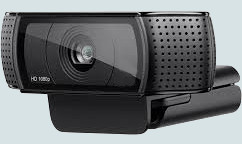
They are the quick solution for connecting a camera to your PC. All you need is the supplied driver software, so you can be up and running in minutes. USB cameras will work with almost any video capture software.
However, there are some snags. Although you can connect many webcams to a single computer, they are more or less limited to arm’s reach because a USB cable is not designed for long distance. It is possible to use "Active" (amplified) USB extensions, but these cables are expensive.
USB cameras vary widely in their quality. Cheap ones don’t always provide clear or accurate images. Artefacts (visible defects) include motion blur and some oddness caused by compressing the image before sending it to your PC. Some also perform badly in poor lighting conditions, providing grainy images and low frame rate.
 The good news is that some good quality USB cameras have a high resolution and a fast frame rate video. Some even come with zoom lens.
Automatic variable focus is not desirable for motion detection as it introduces movement when auto-focusing,
but auto-focus can usually be disabled in the camera's settings. Resolution varies greatly depending on the model, from standard 320x240 to
4K. Don't let the amount of pixels be your only guide for judging the quality of a camera; the price of the camera is your first clue about the quality of its images.
The good news is that some good quality USB cameras have a high resolution and a fast frame rate video. Some even come with zoom lens.
Automatic variable focus is not desirable for motion detection as it introduces movement when auto-focusing,
but auto-focus can usually be disabled in the camera's settings. Resolution varies greatly depending on the model, from standard 320x240 to
4K. Don't let the amount of pixels be your only guide for judging the quality of a camera; the price of the camera is your first clue about the quality of its images.
You might rarely see these, but if your project requires an outstanding camera, you might have to go for an industrial camera. They are not bought in retail stores, rather from camera distributors. Most such cameras will only function with software designed specifically for them.
Consider such cameras if your project requires very high framerate (60fps+), or very high resolution, or a very stable image, or special lens. Some use USB connections, some connect thru the network, and some require a special video acquisition card in the PC. The price for these cameras usually start in a low hundred$, and sky is the limit for the price for higher end industrial cameras.
Webcam Zone Trigger works with certain industrial camera, follow this link if you'd like more info.
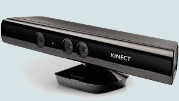 The
Microsoft Kinect is probably the most famous 3D camera,
there are other such products on the market but at this time each model of 3D
camera require custom software. Zone Trigger has a special mode to support some 3D cameras. The software will detect not only if something is moving within a certain zone, but also how far away from the camera it should check for motion.
The
Microsoft Kinect is probably the most famous 3D camera,
there are other such products on the market but at this time each model of 3D
camera require custom software. Zone Trigger has a special mode to support some 3D cameras. The software will detect not only if something is moving within a certain zone, but also how far away from the camera it should check for motion.
Most 3D cameras are very reliable because they only use infra-red, therefore visible light will not interfere with the motion detection. This is a HUGE advantage. One of the downsides is that most 3D cameras cannot see very far ahead, thus they cannot be used in every situation. However, they usually have both a 3D and a Color sensor embedded, and it is possible to use both at the same time.
Follow this link if you'd like more info about how to use the Kinect with Zone Trigger software.
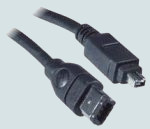 The DV stands for “Digital Video”. Often called “camcorders”, these provide awesome image quality and a
reliable frame-rate. They are almost always equipped with a zoom lens, and may have desirable features such as
night-vision. If they have a FireWire connection, then are compatible with Direct-X, they should work with most any recent video capture software.
Not many camcorders stream video thru their USB port because most manufacturers
do not provide webcam drivers, so this is rarely an option. Most camcorders use
a HDMI connection, which requires a HDMI imput in the computer, which is an
optional component that you must purchase. See here for
more info...
The DV stands for “Digital Video”. Often called “camcorders”, these provide awesome image quality and a
reliable frame-rate. They are almost always equipped with a zoom lens, and may have desirable features such as
night-vision. If they have a FireWire connection, then are compatible with Direct-X, they should work with most any recent video capture software.
Not many camcorders stream video thru their USB port because most manufacturers
do not provide webcam drivers, so this is rarely an option. Most camcorders use
a HDMI connection, which requires a HDMI imput in the computer, which is an
optional component that you must purchase. See here for
more info...
Like USB cameras, DV cameras are connected to your PC with limited cable length, this time FireWire (IEEE 1394) or HDMI.
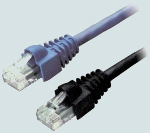 Often known as “network cameras”, they are complex remote-controlled devices that connect to a network instead of directly to your PC. Some can supply very high-resolution images, often with superior image quality, however the price difference is very steep between a normal IP cam and a hi-resolution one.
IP cameras are not physically connected to your PC since they can broadcast video over a local network (CCTV) or the Internet. Most have embedded web-servers, and some have internal motion detection systems. They are now usually wireless and will connect directly to your Wifi network. The downside is that most networks transmit data slower than a direct connection to the PC, and this often results in a low or unstable frame-rate. IP cams are pretty good for surveillance, but not very good for high-precision motion detection projects.
Usually lacking webcam drivers, they mostly work with a few motion detection programs that are designed specifically for IPcams. Even then, not all IP cams are the same, and often some will only work with their supplied software. Most good IPcams now support RTSP or ONVIF protocols, which means that they will connect easily to software that also supports these protocols. Webcam Zone Trigger supports RTSP.
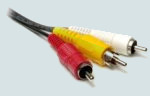 RCA connections for analog camerasAnalogue cameras belong to a whole different world. They are fast
(30 fps), provide images with no compression, no artefacts, little motion blur, and
use any cable length you need. The camera may be equipped with a zoom lens or infra-red vision. Some are even “wireless” (but watch the reception quality
(snow), since local interference might compromise motion detection).
RCA connections for analog camerasAnalogue cameras belong to a whole different world. They are fast
(30 fps), provide images with no compression, no artefacts, little motion blur, and
use any cable length you need. The camera may be equipped with a zoom lens or infra-red vision. Some are even “wireless” (but watch the reception quality
(snow), since local interference might compromise motion detection).
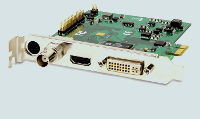
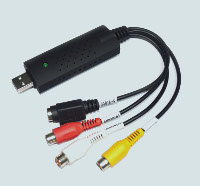
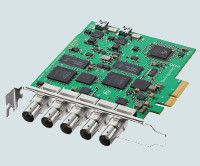
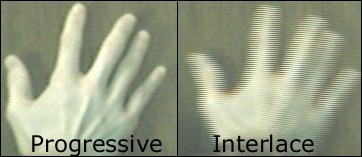
The downside of analogue cameras is that they are complicated to connect, and they are resource-intensive. Connecting one to a PC requires video capture hardware. Many analogue cameras produce interlaced images, requiring special, often 3rd party software filters, which may introduce artefacts or reduce picture quality. Overall, using an analogue camera has advantages, but the resulting image quality is often inferior to most webcams.
The compatibility of the motion detection software is dependent on the video capture device. Here are a few capture device types:
In the best conditions you must have the following:
 Webcam
Zone Trigger is a camera capture and motion detection software. If you found this article interesting, you should check out this app.
Webcam
Zone Trigger is a camera capture and motion detection software. If you found this article interesting, you should check out this app.
 If you have questions about the Zone Trigger products or if you require consultation and advice on your computer vision projects, please contact Omega Unfold's technical support:
support@zonetrigger.com
If you have questions about the Zone Trigger products or if you require consultation and advice on your computer vision projects, please contact Omega Unfold's technical support:
support@zonetrigger.com